목표:이클립스를 사용하여 mysql과 java 연결 후 데이터 삽입, 출력
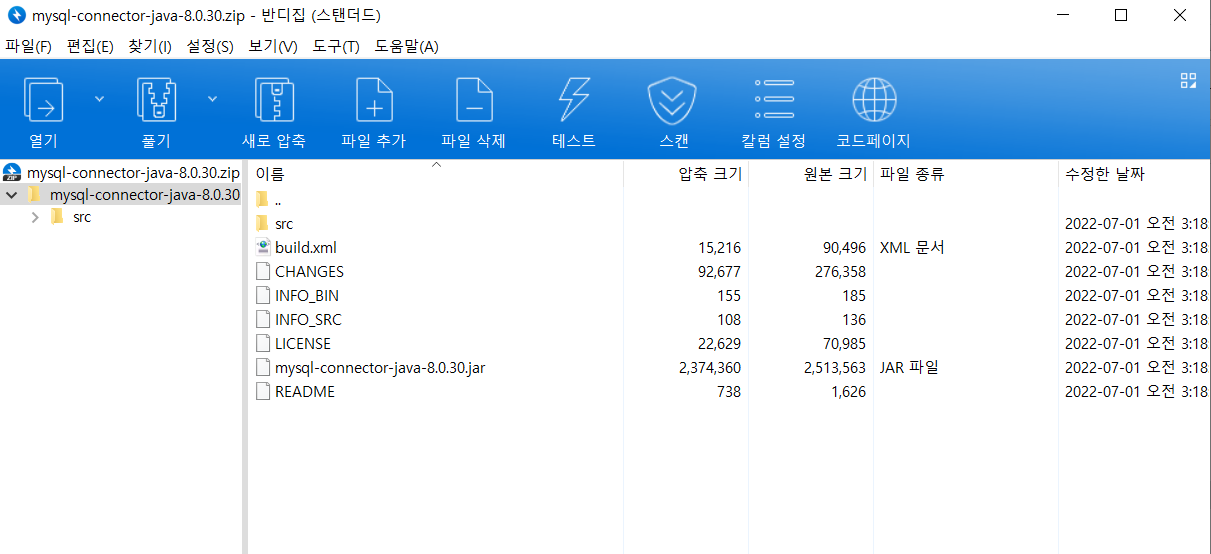
1. JAVA와 MySQL 연결에 필요한 mysql connector- J 다운받기
https://dev.mysql.com/downloads/connector/j/
Select Operating System에서
Platform Independent 선택


ZIP 파일 다운 받고 원하는 곳에서 압축 풀기

2. 이클립스에서 설정하기
연결하고자 하는 프로젝트의 설정에 들어간다
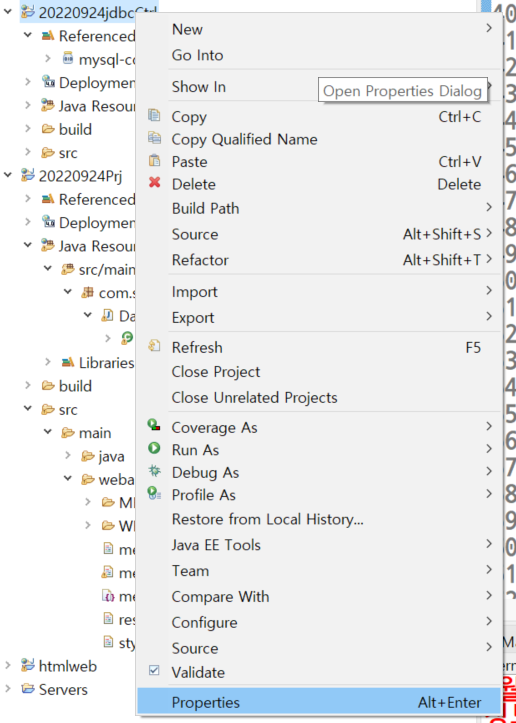
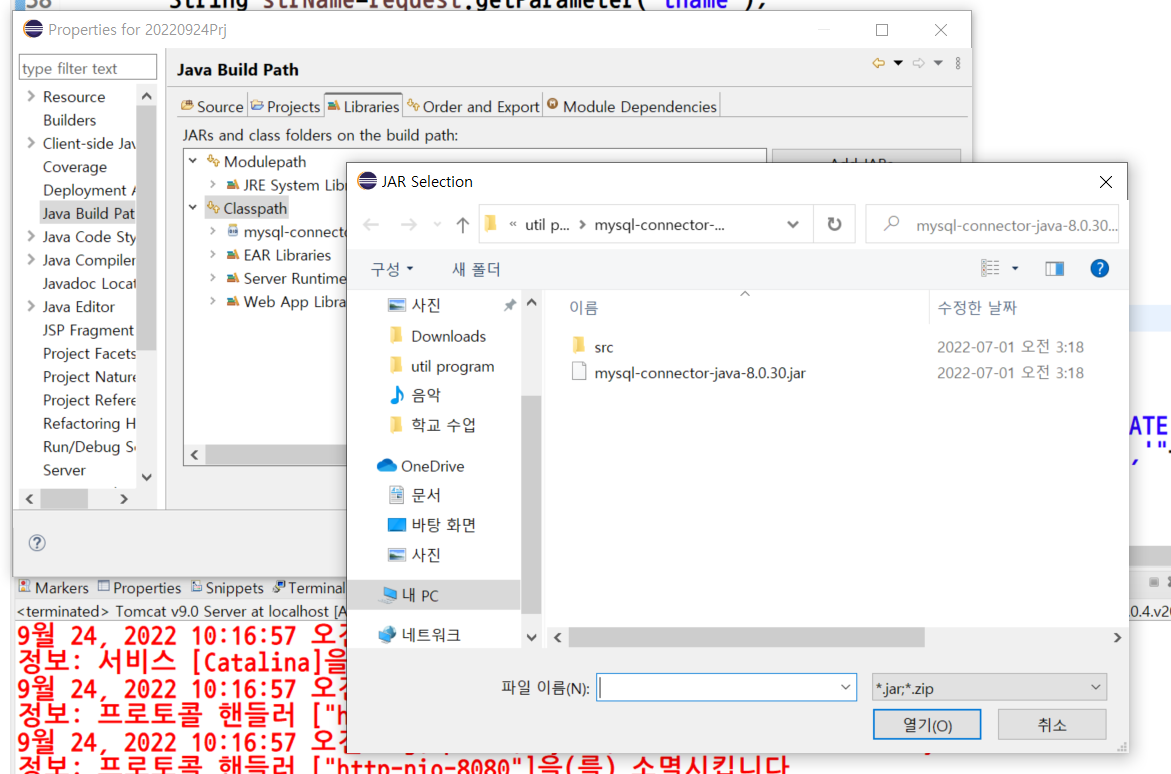
Properties-Java Build Path-Libraries에 들어가고
Classpath를 선택한 뒤 Add External JAR를 누른다

방금 압축을 푼 mysql-connector-java-8.0.30의 mysql-connector-java-8.0.30.jar를 넣는다
Apply 클릭 후
Deployment Assembly에서 Add를 누른다
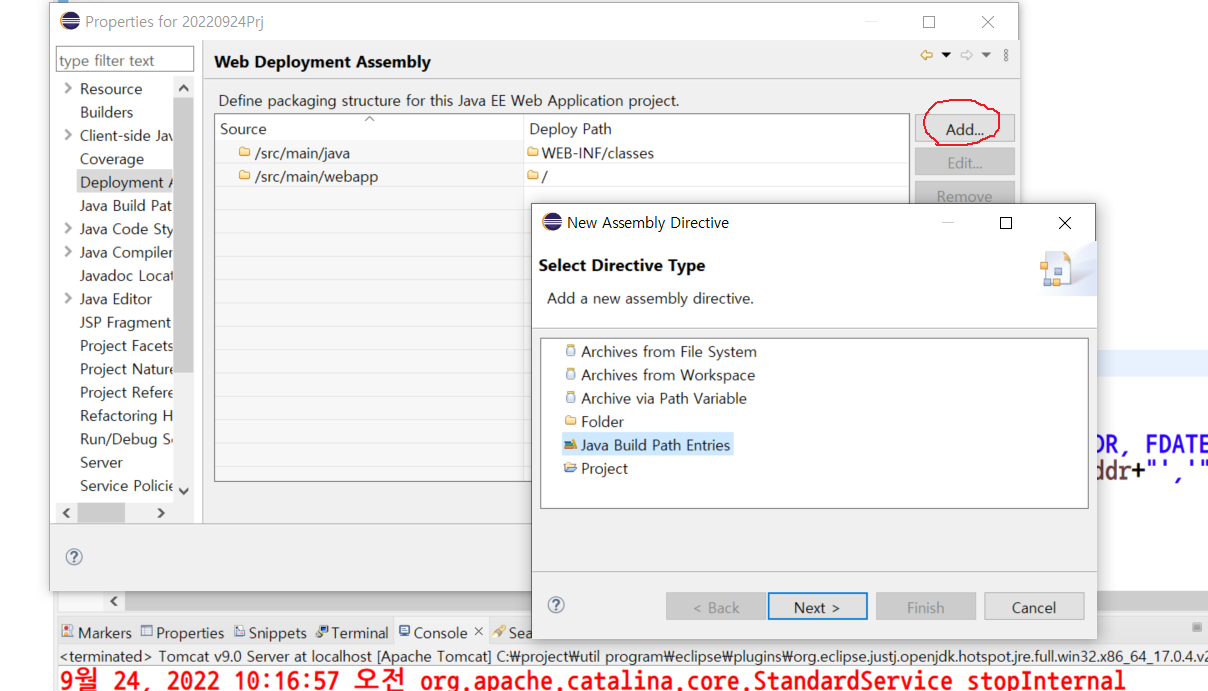
Java Build Path Entries를 클릭하고 Next 클릭
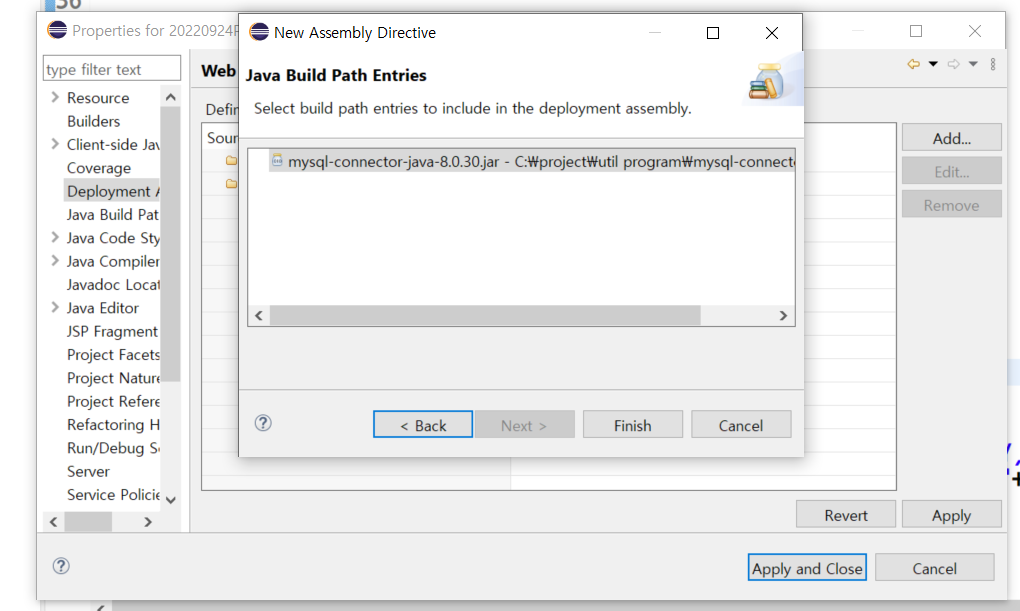
Java Build Path Entries 안에 있는 mysql-connector-java-8.0.30.jar를 선택하고 Finish를 클릭한다
Apply and Close를 눌러 창을 닫는다.
3. 연결 됐는지 확인한다
MYSQl 코드
CREATE DATABASE study;
USE study;
-- DATABASE study를 생성하고 사용한다


drop table TMEMBER;
-- TMEMBER table 삭제 코드

--TMEMBER table 생성
CREATE TABLE TMEMBER(
	FIDX		INT auto_increment,
    FEMAIL		varchar(20) NOT NULL,
    FNAME		nvarchar(20) NOT NULL,
    FPASS		varchar(20) NOT NULL,
    FHOBBY		varchar(9) NOT NULL,
    FADDR		varchar(50) NOT NULL,
    FDATE		date	NOT NULL,
    PRIMARY KEY(FIDX)
);


desc TMEMBER;
-- 생성 되었나 확인


insert into tmember (FEMAIL, FNAME, FPASS, FHOBBY, FADDR, FDATE)value('dlr','익명','12','부산','1,2',SYSDATE());
-- 데이터 삽입
select*from tmember;
-- table 출력
Dateservelt_1.java
package com.servlet;

import java.io.IOException;
import java.io.PrintWriter;

import javax.servlet.ServletException;
import javax.servlet.annotation.WebServlet;
import javax.servlet.http.HttpServlet;
import javax.servlet.http.HttpServletRequest;
import javax.servlet.http.HttpServletResponse;

//mySQL과 연결하기위해 import
import java.sql.Connection;
import java.sql.DriverManager;
import java.sql.PreparedStatement;
import java.sql.ResultSet;
import java.sql.SQLException;


@WebServlet("/ser")//mem_regForm.js에서 fn.action = "ser";로 servelt 연결
public class Dateservelt_1 extends HttpServlet {
	private static final long serialVersionUID = 1L;

    public Dateservelt_1() {
        super();
        // TODO Auto-generated constructor stub
    }

	protected void doGet(HttpServletRequest request, HttpServletResponse response) throws ServletException, IOException {
		request.setCharacterEncoding("UTF-8");
		response.setContentType("text/html;charset=UTF-8");
        	//한글화
		PrintWriter out=response.getWriter();
		//out.print를 사용할 수 있게 된다

		String url="jdbc:mysql://localhost:3306/study?serverTimezone=UTC";


		try {
			//MYSQL 드라이버 로드
			Class.forName("com.mysql.jdbc.Driver");//자바에서 mysql을 사용하기 위한 드라이버
			Connection conn=null;
			//mySQL서버 연결
			conn= DriverManager.getConnection(url,"root","1234");
			//getConnection(url, user, passwd)
			out.print("드라이버 연결 성공!!");

		}catch(ClassNotFoundException e) {
			//드라이버 로딩 오류
			e.printStackTrace();
			out.print("ClassNotFoundException:"+e.getMessage());
			out.print("드라이버 로딩 실패");
		}
		catch(SQLException e) {
			//mysql 서버에 연결 오류가 발생했을 경우
			e.printStackTrace();
			out.print("ClassNotFoundException:"+e.getMessage());
			out.print("mysql 서버에 연결 실패");
		}

	}


	protected void doPost(HttpServletRequest request, HttpServletResponse response) throws ServletException, IOException {

	}

}
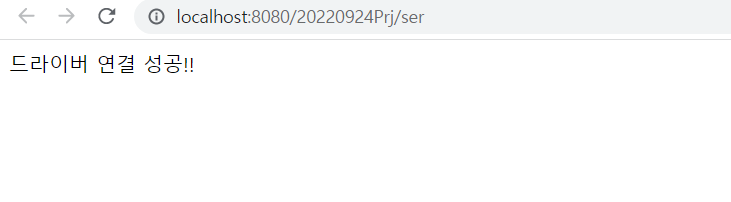
해당 코드 실행 성공시 아래와 같이 출력
4. java에서 데이터 삽입
mem_regForm_2.html
<!DOCTYPE html>
<html lang="ko">
    <head>
        <meta charset="UTF-8">
        <meta http-equiv="X-UA-Compatible" content="IE=edge">
        <meta name="viewport" content="width=device-width, initial-scale=1.0">
        <title>Servlet : 데이터 전송 예제 2</title>
        <link href="style.css" rel="stylesheet" />

        <script src="https://code.jquery.com/jquery-3.6.1.js"></script>
        <script src="mem_regForm_2.js"></script>


    </head>
    <body>
          <div id="container">
            <h4>회원가입</h4>
            <form name="fn" method="get" enctype="multipart/form-data">
                <table>
                    <caption>
                        회원가입을 위한 양식 문서
                    </caption>
                    <colgroup>
                        <col>
                        <col>
                    </colgroup>
                    <tbody>
                        <tr>
                            <th>
                                <label for="temail">이메일1</label>
                            </th>
                            <td>
                                <input type="text" name="temail" id="temail" minlength="1" maxlength="50" value="" />
                            </td>
                        </tr>
                        <tr>
                            <th>
                                <label for="tname">이름</label>
                            </th>
                            <td>
                                <input type="text" name="tname" id="tname" minlength="2" maxlength="20" value="" />
                            </td>
                        </tr>
                        <tr>
                            <th>
                                <label for="tpwd">비밀번호</label>
                            </th>
                            <td>
                                <input type="password" name="tpwd" id="tpwd" minlength="8" maxlength="16" value="" />
                            </td>
                        </tr>
                        <tr>
                            <th>
                                <label for="tpwd2">비밀번호 확인</label>
                            </th>
                            <td>
                                <input type="password" name="tpwd2" id="tpwd2" minlength="8" maxlength="16" value="" />
                            </td>
                        </tr>
                        <tr>
                            <th>
                                취미
                            </th>
                            <td>
                                <input type="checkbox" name="thobby" id="thobby1" value="1" />
                                <label for="thobby1">운동</label>
                                <input type="checkbox" name="thobby" id="thobby2" value="2" />
                                <label for="thobby2">독서</label>
                                <input type="checkbox" name="thobby" id="thobby3" value="3" />
                                <label for="thobby3">낚시</label>
                                <input type="checkbox" name="thobby" id="thobby4" value="4" />
                                <label for="thobby4">등산</label>
                                <input type="checkbox" name="thobby" id="thobby5" value="5" />
                                <label for="thobby5">음악감상</label>
                            </td>
                        </tr>
                        <tr>
                            <th>
                                <label for="taddr">거주지역</label>
                            </th>
                            <td>
                                <select name="taddr">
                                    <option value="">== 거주지역 선택 ==</option>
                                    <option value="부산">부산광역시</option>
                                    <option value="대구">대구광역시</option>
                                    <option value="인천">인천광역시</option>
                                    <option value="광주">광주광역시</option>
                                    <option value="대전">대전광역시</option>
                                    <option value="울산">울산광역시</option>
                                    <option value="서울">서울특별시</option>
                                    <option value="제주">제주특별자치도</option>
                                    <option value="경기">경기도</option>
                                    <option value="강원">강원도</option>
                                    <option value="충북">충청북도</option>
                                    <option value="충남">충청남도</option>
                                    <option value="경북">경상북도</option>
                                    <option value="경남">경상남도</option>
                                    <option value="잔북">전라북도</option>
                                    <option value="전남">전라남도</option>
                                </select>
                            </td>
                        </tr>
                    </tbody>
                    <tfoot>
                        <tr>
                            <td colspan="2">
                                <span id="btnReg">회원가입</span>
                                <span>가입취소</span>
                            </td>
                        </tr>
                    </tfoot>
                </table>
            </form>
            <div id="resultArea">
            </div>
          </div>
    </body>
</html>
reset.css
@charset "utf-8";

html {-webkit-text-size-adjust:100%;line-height:1.15}
body {margin:0}
main {display:block}
h1 {font-size:2em;margin:.67em 0}
hr {box-sizing:content-box;height:0;overflow:visible}
pre {font-family:monospace, monospace;font-size:1em}
a {background-color:transparent}
abbr[title] {border-bottom:none;text-decoration:underline;text-decoration:underline dotted}
b, strong {font-weight:bolder}
code, kbd, samp {font-family:monospace, monospace;font-size:1em}
small {font-size:80%}
sub, sup {font-size:75%;line-height:0;position:relative;vertical-align:baseline}
sub {bottom:-.25em}
sup {top:-.5em}
img {border-style:none}
button, input, optgroup, select, textarea {font-family:inherit;font-size:100%;line-height:1.15;margin:0}
button, input {overflow:visible}
button, select {text-transform:none}
[type=button], [type=reset], [type=submit], button {-webkit-appearance:button}
[type=button]::-moz-focus-inner, [type=reset]::-moz-focus-inner, [type=submit]::-moz-focus-inner, button::-moz-focus-inner {border-style:none;padding:0}
[type=button]:-moz-focusring, [type=reset]:-moz-focusring, [type=submit]:-moz-focusring, button:-moz-focusring {outline:1px dotted ButtonText}
fieldset {padding:.35em .75em .625em}
legend {box-sizing:border-box;color:inherit;display:table;max-width:100%;padding:0;white-space:normal}
progress {vertical-align:baseline}
textarea {overflow:auto}
[type=checkbox], [type=radio] {box-sizing:border-box;padding:0}
[type=number]::-webkit-inner-spin-button, [type=number]::-webkit-outer-spin-button {height:auto}
[type=search] {-webkit-appearance:textfield;outline-offset:-2px}
[type=search]::-webkit-search-decoration {-webkit-appearance:none}
::-webkit-file-upload-button {-webkit-appearance:button;font:inherit}
details {display:block}
summary {display:list-item}
[hidden], template {display:none}
table {
	border-collapse: collapse;
	border-spacing: 0;
}
style.css
@import url("reset.css");
@import url(https://cdn.jsdelivr.net/gh/moonspam/NanumSquare@1.0/nanumsquare.css);
/*-------------------------------------------------------*/
html * {
    font-family: 'NanumSquare', sans-serif;
    color:#222;
}
h4 {
    font-size:1.2rem;
    margin:0px;
}
a:active, a:link, a:hover {color:#222;text-decoration: none;}
table { width:100%; }
table caption {
    position: absolute;
    visibility: hidden;
}
col:first-child {width:150px;}
col:last-child {width:auto;}

table, th, td {
    border: 1px solid #ccc;
    padding: 7px;
    background-color: #fff;
}
th {
    background-color:#efefef;
}

h4 {
    padding : 10px;
}
tfoot td { text-align: center;}
tfoot td span {
    display:inline-block;
    padding:5px 20px;
    border:1px solid #ccc;
}
tfoot td span:hover {background-color: #222; color: #fff; cursor: pointer;}
label {margin-right:10px;}
#tpwd, #tpwd2 {font-family:"굴림";}
/* =========== id 설정부 ==================*/
#container {
    width:960px;
    margin:0px auto;
    padding:10px;
    position:relative;
}
mem_regForm_2.js
$().ready(function() {
    var passChk = false;
    $("#btnReg").on("click",function(ev){
    //btnReg를 클릭했을 때


        if(fn.temail.value=="") {
            alert("이메일은 반드시 입력해야 합니다.");
            fn.temail.focus();
            return;
        }

        if(fn.tname.value=="") {
            alert("이름은 반드시 입력해야 합니다.");
            fn.tname.focus();
            return;
        }

        if(fn.tpwd.value=="") {
            alert("비밀번호는 반드시 입력해야 합니다.");
            fn.tpwd.focus();
            return;
        }

        if(fn.tpwd2.value=="") {
            alert("확인을 위한 비밀번호도 반드시 입력해야 합니다.");
            fn.tpwd2.focus();
            return;
        }

        if($("input:checked").length==0) {
            alert("취미는 하나 이상을 선택하셔야 합니다.");
            return;
        }

        if(fn.taddr.value=="") {
            alert("거주지를 선택해 주세요.");
            return;
        }

        fn.method="get";//get 방식으로 연결
        fn.action = "JDBC";//servelt과 연결되는 코드
        fn.submit();


    });//end:$("#btnReg").on("click")
});//end:$().ready()
JDBCctrl_2.java
import java.io.IOException;
import java.io.PrintWriter;
import java.sql.Connection;
import java.sql.DriverManager;
import java.sql.SQLException;

import javax.servlet.ServletException;
import javax.servlet.annotation.WebServlet;
import javax.servlet.http.HttpServlet;
import javax.servlet.http.HttpServletRequest;
import javax.servlet.http.HttpServletResponse;

import java.sql.*;


@WebServlet("/JDBC")//js와 연결되는 부분
public class JDBCctrl_2 extends HttpServlet {
	private static final long serialVersionUID = 1L;


    public JDBCctrl_2() {
        super();

    }


	protected void doGet(HttpServletRequest request, HttpServletResponse response) throws ServletException, IOException {
		request.setCharacterEncoding("UTF-8");
		response.setContentType("text/html;charset=UTF-8");
        //한글화
		PrintWriter out=response.getWriter();
		//out.print를 사용할 수 있게 된다

		String strEmail=request.getParameter("temail");
		String strName=request.getParameter("tname");
		String strPwd=request.getParameter("tpwd");
		String strAddr=request.getParameter("taddr");

		String[]arrBobby=request.getParameterValues("thobby");
		//getParameterValues로 값을 들고 온다
		String strHobby=String.join(",",arrBobby);


		//========데이터 베이스에 연결 시작=====
		String url="jdbc:mysql://localhost:3306/study?serverTimezone=UTC";


		try {
			//MYSQL 드라이버 로드
			Class.forName("com.mysql.jdbc.Driver");//자바에서 mysql을 사용하기 위한 드라이버
			Connection conn=null;
			//mySQL서버 연결
			conn= DriverManager.getConnection(url,"root","1234");

			out.println("드라이버 로딩 성공"); //드라이버 로딩 확인
			String sql="insert into tmember (FEMAIL, FNAME, FPASS, FHOBBY, FADDR, FDATE)"
					+ " value('dlr','익명1','12','1,2','부산',SYSDATE());";//데이터를 삽입한다.

			//String sql="update tmember set famil='csjin@', fname='이순신',"
			//+"fpass='1234', fhobby='1,2,3,4,5', faddr='경기', where fidx=1;";//데이터를 업데이트 한다
			PreparedStatement pstmt=conn.prepareStatement(sql);//데이터베이스 스테이트먼트 생성==>준비단계
			int rowCnt=pstmt.executeUpdate();//select문을 제외한 쿼리문을 실행시킨다. 반환되는 값은 쓰지 않더라도 받아주는 것이 좋다
			out.println("데이터 입력 성공!!");

		}catch(ClassNotFoundException e) {
			//드라이버 로딩 오류
			e.printStackTrace();
			out.print("ClassNotFoundException:"+e.getMessage());
			out.print("드라이버 로딩 실패");
		}
		catch(SQLException e) {
			//mysql 서버에 연결 오류가 발생했을 경우
			e.printStackTrace();
			out.print("ClassNotFoundException:"+e.getMessage());
			out.print("mysql 서버에 연결 실패");
		}
		//========데이터 베이스에 연결 완료=====

		String sql="insert into tmember (FEMAIL, FNAME, FPASS, FHOBBY, FADDR, FDATE)"
				+ "value('"+strEmail+"','"+strName+"','"+strPwd+"','"+strAddr+"','"+strHobby+"','"+strHobby+"',SYSDATE())";

		//out.print(sql); //출력해서 정상적으로 나오는지 확인한다
		//정상 출력시 mysql에 입력해서 값이 들어가는지 확인한다


	}


	protected void doPost(HttpServletRequest request, HttpServletResponse response) throws ServletException, IOException {

	}

}
html 파일 실행 후

mysql 출력

5. 웹페이지로 출력
JDBCLIST_3
package com.prjJDBCLIST;

import java.io.IOException;
import java.io.PrintWriter;
import java.sql.Connection;
import java.sql.DriverManager;
import java.sql.PreparedStatement;
import java.sql.ResultSet;
import java.sql.SQLException;

import javax.servlet.ServletException;
import javax.servlet.annotation.WebServlet;
import javax.servlet.http.HttpServlet;
import javax.servlet.http.HttpServletRequest;
import javax.servlet.http.HttpServletResponse;


@WebServlet("/JD")
public class JDBCLIST_3 extends HttpServlet {
	private static final long serialVersionUID = 1L;


    public JDBCLIST_3() {
        super();

    }


    protected void doGet(HttpServletRequest request, HttpServletResponse response) throws ServletException, IOException {
		request.setCharacterEncoding("UTF-8");
		response.setContentType("text/html;charset=UTF-8");
		PrintWriter out=response.getWriter();//out.print를 사용할 수 있게 된다


		//========데이터 베이스에 연결 시작=====
		String url="jdbc:mysql://localhost:3306/study?serverTimezone=UTC";


		try {
			//MYSQL 드라이버 로드
			Class.forName("com.mysql.jdbc.Driver");//자바에서 mysql을 사용하기 위한 드라이버
			//mySQL서버 연결
			Connection conn= DriverManager.getConnection(url,"root","1234");
			out.print("드라이버 로딩 성공"); //확인하면 닫는다

			String sql="select FIDX, FEMAIL, FNAME, FPASS, FHOBBY, FADDR, FDATE from tmember"
					+" order by fidx desc";//테이블에 있던 데이터 페이지에 출력


			PreparedStatement pstmt=conn.prepareStatement(sql);
			//ResultSet rs=pstmt.executeQuery(sql);
			ResultSet rs=pstmt.executeQuery();
			//rs의 역할=>recodeset의 커서 역할로 순서대로 테이블을 읽어들인다.

			//rs.next();
			//rs를 다음 행으로 보낸다
			String rsidx,rsName,rsEmail, rsHobby, rsAddr;

			//while (rs.next())out.print(rs.getString("fname"));//fname 출력하기
			//out.print(rs.getString(1));//1번째 출력하기

			while (rs.next()) {

				rsidx=rs.getString("fidx");
				rsName=rs.getString("fname");
				rsEmail=rs.getString("FEMAIL");
				rsHobby=rs.getString("FHOBBY");
				rsAddr=rs.getString("FADDR");

				out.println("[\""+rsidx+"\",\""+rsName+"\",\""+rsEmail+"\",\""+rsHobby+"\",\""+rsAddr+"\"]");


			}


		}
		catch(ClassNotFoundException e) {
			//드라이버 로딩 오류
			e.printStackTrace();
			out.print("ClassNotFoundException:"+e.getMessage());
			out.print("드라이버 로딩 실패");
		}

		catch(SQLException e) {
			//mysql 서버에 연결 오류가 발생했을 경우
			e.printStackTrace();
			out.print("ClassNotFoundException:"+e.getMessage());
			out.print("mysql 서버에 연결 실패");
		}
		//========데이터 베이스에 연결 완료=====


	}


	protected void doPost(HttpServletRequest request, HttpServletResponse response) throws ServletException, IOException {

	}

}
성공 시

'2022-코딩 수업 정리' 카테고리의 다른 글
| 게시판 만들기-1 (0) | 2022.09.30 |
|---|---|
| JSP, HTML 활용 코드 (0) | 2022.09.26 |
| html 안에서 JSP 코딩 태그 정리 (0) | 2022.09.26 |
| 이클립스 Encoding을 UTF-8로 바꾸기 (0) | 2022.09.26 |
| 이클립스 JSP 기본 코드 설정 바꾸기 (0) | 2022.09.26 |


